
Download SpeakPal – AI‑Powered Language Learning Tool for Real‑Time Conversation Practice
Overview
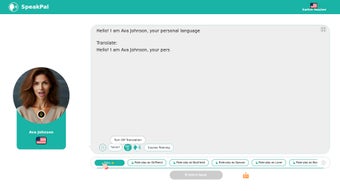
SpeakPal is a web‑based language learning platform that leverages cutting‑edge artificial intelligence to turn language study into a dynamic, conversation‑first experience. Unlike traditional textbook‑heavy apps, SpeakPal puts learners directly into realistic dialogues, role‑playing scenarios, and real‑time chats with native‑speaker tutors. The platform currently supports 30 languages and serves users across 48 countries, making it a truly global solution for anyone who wants to speak a new language with confidence.
What sets SpeakPal apart is its emphasis on practical usage. Over 100 curated scenarios span business meetings, travel, daily errands, and cultural etiquette, ensuring that learners acquire vocabulary, grammar, and communication skills that translate straight into the real world. The curriculum is modular, allowing beginners to start with essential phrases while advanced users can dive into industry‑specific jargon.
SpeakPal also offers flexible learning pathways. Users can switch between languages on the fly, download exercises for offline practice, and even request tailored training sessions that focus on specific weaknesses. Whether you’re a student preparing for an exchange program, a professional needing business‑level fluency, or a hobbyist exploring a new culture, SpeakPal’s AI‑driven approach makes language acquisition both accessible and enjoyable.
In addition to the conversational core, SpeakPal provides a robust analytics dashboard that visualizes progress over time, highlights recurring errors, and suggests targeted practice. The platform’s secure cloud storage means that every lesson, chat transcript, and achievement badge is saved automatically, so learners never lose their hard‑earned data. By combining AI, live human interaction, and data‑driven insights, SpeakPal delivers a comprehensive, modern alternative to static language courses, positioning itself as a leader in the fast‑evolving edtech landscape.
Core Features & Benefits
- AI‑Powered Conversational Engine: Generates context‑aware dialogues that adapt to the learner’s proficiency level.
- Real‑Time Native Tutor Chat: Connects users with vetted native speakers for instant feedback.
- 100+ Role‑Playing Scenarios: Covers business, travel, daily life, and niche domains such as medical or legal terminology.
- Multi‑Language Switching: Seamlessly move between any of the 30 supported languages without leaving the platform.
- Downloadable Exercise Packs: Offline PDFs, audio clips, and flashcards for on‑the‑go practice.
- Progress Tracker & Adaptive Learning Path: Tracks vocabulary retention, grammar mastery, and conversation fluency, adjusting the curriculum in real time.
- Gamified Rewards System: Earn badges, points, and certificates that motivate continuous learning.
- Secure Cloud Storage: All user data, conversation logs, and progress metrics are encrypted and stored securely.
These features collectively create a learning environment that feels less like a classroom and more like a social experience. The AI engine not only suggests appropriate responses but also highlights pronunciation errors, grammar slips, and cultural nuances, giving learners a holistic view of language competence. Moreover, the native tutor chat adds a human touch, allowing users to ask spontaneous questions and receive personalized corrections that a purely AI system might miss.
From a productivity standpoint, SpeakPal’s adaptive path saves time. Instead of grinding through irrelevant lessons, the platform focuses on gaps identified by the learner’s performance data. This results in faster progression, higher retention rates, and a measurable boost in confidence when speaking with real people.
The gamified rewards system further encourages daily practice by turning milestones into visible achievements. Badges appear on user profiles, fostering a sense of community when learners share progress on social media. Meanwhile, the downloadable exercise packs ensure that learners can continue studying offline, reinforcing concepts without requiring a constant internet connection.
Altogether, these benefits position SpeakPal as a versatile, secure, and engaging tool for anyone serious about mastering a new language.
Installation, Usage & Compatibility
Getting Started – Simple Web Access
Since SpeakPal is a web‑based solution, there is no traditional “download” in the sense of a desktop installer. Users simply visit SpeakPal.com, create a free account, and begin their language journey instantly. For those who prefer a dedicated app experience, native iOS and Android wrappers are available in the Apple App Store and Google Play Store, providing push notifications, offline sync, and a more mobile‑friendly UI. The web version is fully responsive, automatically adapting to desktop, tablet, or smartphone screen sizes, so learners enjoy a consistent experience across devices.
Step‑by‑Step Setup
- Navigate to the SpeakPal website or launch the mobile app.
- Click “Sign Up” and enter your email, or use a Google/Facebook account for one‑click registration.
- Choose your target language and initial proficiency level (Beginner, Intermediate, Advanced).
- Complete the short onboarding quiz – this helps the AI tailor the first set of scenarios to your needs.
- Explore the dashboard: access “Scenarios,” “Live Tutor,” “My Progress,” and “Resources.”
- Start a conversation: select a scenario, engage with the AI or a live tutor, and receive instant feedback.
- Download supplemental material by clicking “Export Exercise Pack” within any lesson.
System Requirements & Operating System Support
Because SpeakPal runs in modern browsers, it is compatible with virtually any operating system that supports HTML5, CSS3, and JavaScript. Officially supported platforms include:
- Windows 10 or later (Chrome, Edge, Firefox)
- macOS 11 (Big Sur) or later (Safari, Chrome)
- Linux distributions with recent browsers (Ubuntu, Fedora, etc.)
- iOS 13+ (SpeakPal app)
- Android 8.0+ (SpeakPal app)
The platform requires an internet connection for live AI interactions and tutor chats. However, downloaded exercise packs can be accessed offline, allowing learners to review vocabulary and grammar without constant connectivity. Security is a top priority; all data transmission is encrypted via HTTPS, and personal information is stored in compliance with GDPR and CCPA regulations. For enterprises, SpeakPal also offers single‑sign‑on (SSO) integration and role‑based access controls, making it suitable for corporate language training programs.
Pros, Cons & Frequently Asked Questions
Pros
- Highly interactive AI conversations that mimic real‑world speaking situations.
- Access to live native tutors for personalized correction.
- Extensive library of scenarios covering both everyday and professional contexts.
- Adaptive learning path reduces wasted time on already‑mastered content.
- Cross‑platform compatibility – works on Windows, macOS, Linux, iOS, and Android.
- Secure cloud storage and GDPR‑compliant data handling.
- Free tier available with optional premium subscription for advanced features.
- Gamified rewards keep motivation high and encourage daily practice.
Cons
- Requires a stable internet connection for AI and tutor interactions.
- Premium subscription can be pricey for some users.
- Voice recognition accuracy varies by language and accent.
- Limited offline functionality – only downloadable exercise packs are available offline.
- Initial onboarding quiz may feel lengthy for users seeking instant access.
FAQ – Your Questions Answered
Is there a free version of SpeakPal?
Yes, SpeakPal offers a free tier that includes access to a limited set of scenarios, basic AI conversations, and community‑driven practice. Premium features such as live native tutors and advanced analytics require a subscription.
How does SpeakPal protect my personal data?
All communications are encrypted with HTTPS, and user data is stored on secure servers that comply with GDPR and CCPA. SpeakPal does not sell personal information to third parties.
Can I switch languages mid‑course?
Absolutely. The platform’s multi‑language switching feature lets you add new languages to your dashboard at any time, preserving progress in each language separately.
Do I need any special hardware for the voice‑recognition feature?
A standard microphone (built‑in laptop mic, headset, or smartphone mic) is sufficient. For best results, use a quiet environment and a high‑quality microphone.
What is the refund policy for the premium subscription?
SpeakPal offers a 30‑day money‑back guarantee. If you cancel within the first 30 days, you’ll receive a full refund via the original payment method.
Can I use SpeakPal for corporate training?
Yes, SpeakPal provides an enterprise plan with admin dashboards, bulk licensing, SSO integration, and custom scenario creation to meet specific business language needs.
Conclusion & Call to Action
SpeakPal redefines language learning by putting conversation at the heart of the experience. Its AI‑driven dialogues, real‑time native tutor access, and extensive scenario library create a learning ecosystem that is both immersive and results‑oriented. While a stable internet connection and a modest subscription fee are required for full functionality, the platform’s free tier and flexible offline resources make it a viable option for learners on any budget.
The combination of adaptive learning paths, secure cloud storage, and cross‑platform compatibility ensures that users can practice whenever and wherever they choose, whether on a Windows PC at home, a macOS laptop in a café, or an Android phone on a commute. Moreover, the built‑in analytics give concrete insight into strengths and weaknesses, allowing learners to focus on the areas that matter most for real‑world communication.
If you’re ready to break the barrier between “knowing a language” and “speaking it confidently,” SpeakPal offers the tools you need to practice, improve, and succeed.
Click the button below to start your free trial, explore the AI conversations, and see how quickly you can move from hesitant phrases to fluent dialogues. Empower your language journey today with a secure, modern, and engaging platform that puts you in control of your progress.
Our Review Summary
Pros: Interactive AI, live native tutors, extensive scenarios, adaptive learning, cross‑platform support, secure cloud storage, gamified rewards.
Cons: Requires internet, premium price, voice recognition variability, limited offline functions, onboarding length.



.png)



